Contents
Step 1: Use the Purchase Link Provided by Your Instructor
Step 2: Complete the Checkout Form
Step 4: Receive Voucher Email from CloudLabs
Step 6: Quick Start & Lab Access
📞 CloudLabs Support -Contact Options
Frequently Asked Questions (FAQs)
A step-by-step guide for new users
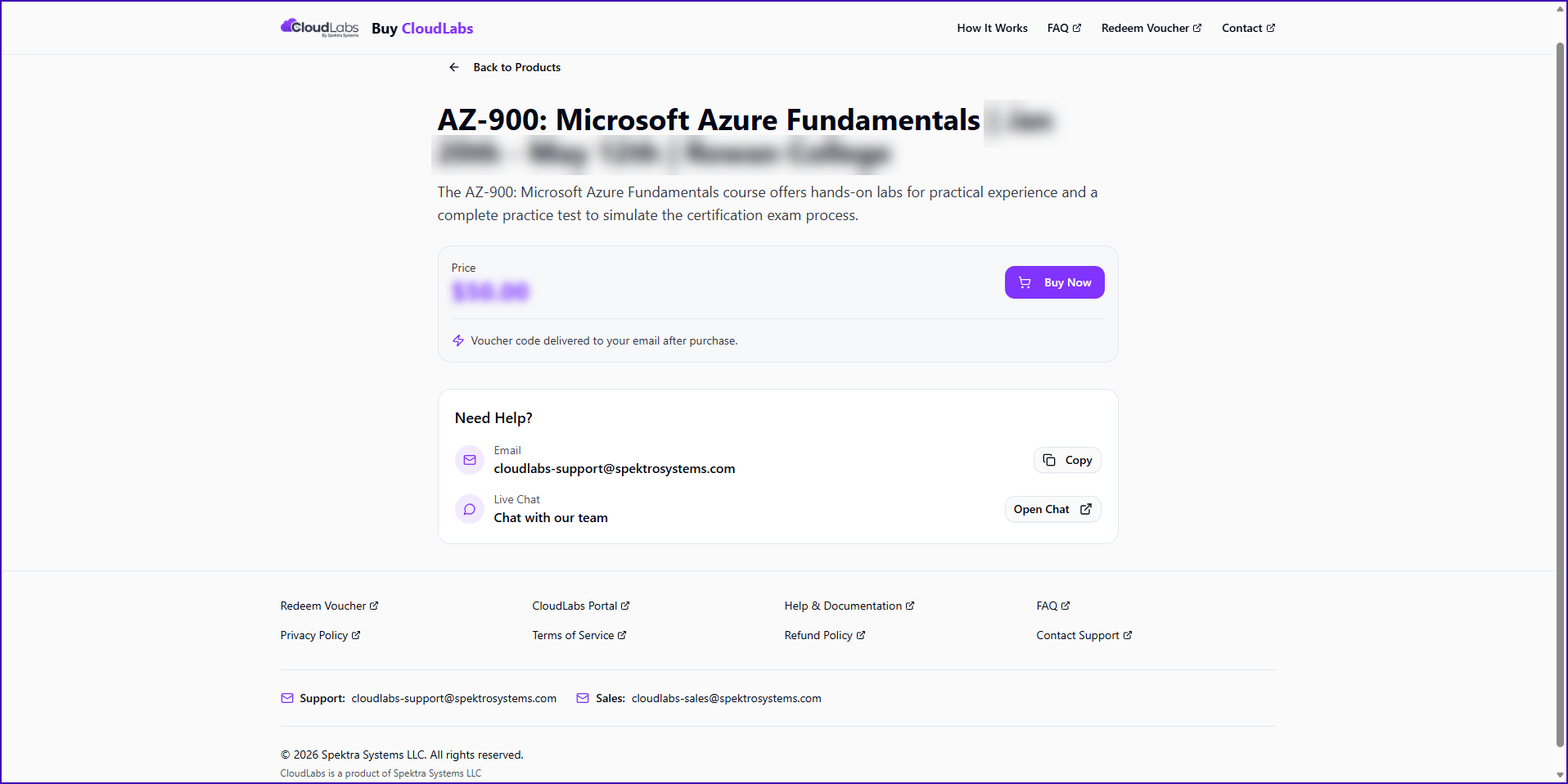
Step 1: Use the Purchase Link Provided by Your Instructor
Students/ Learners must use the purchase link shared by their instructor or professor.
This link takes you directly to the Buy Cloudlabs page, where you can click on Buy Now.
👉 There is no separate login or signup required at this stage.
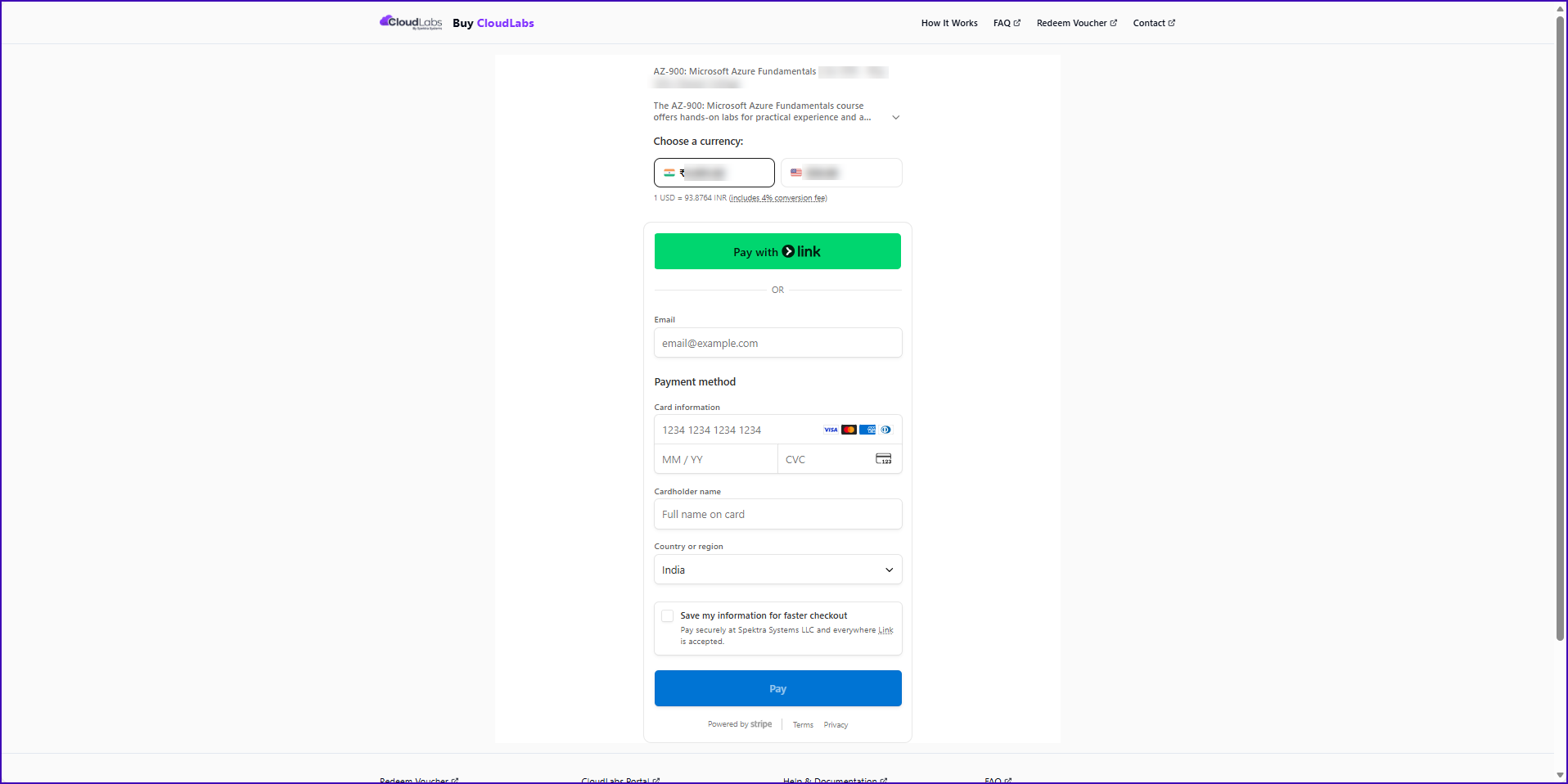
Step 2: Complete the Checkout Form
A. Choose Currency
Select the currency from the dropdown at the top of the page
The total amount updates automatically
B. Contact Information (Mandatory)
You must enter:
Email address
⚠️ This email will be used to send your voucher and activation link
Full name
Phone number (Mandatory)
❗ If the email is incorrect, voucher delivery will fail.
C. Payment Method
Enter card details:
Card number
Expiry date
CVC
Cardholder name
Country/Region
Click Pay to complete the purchase
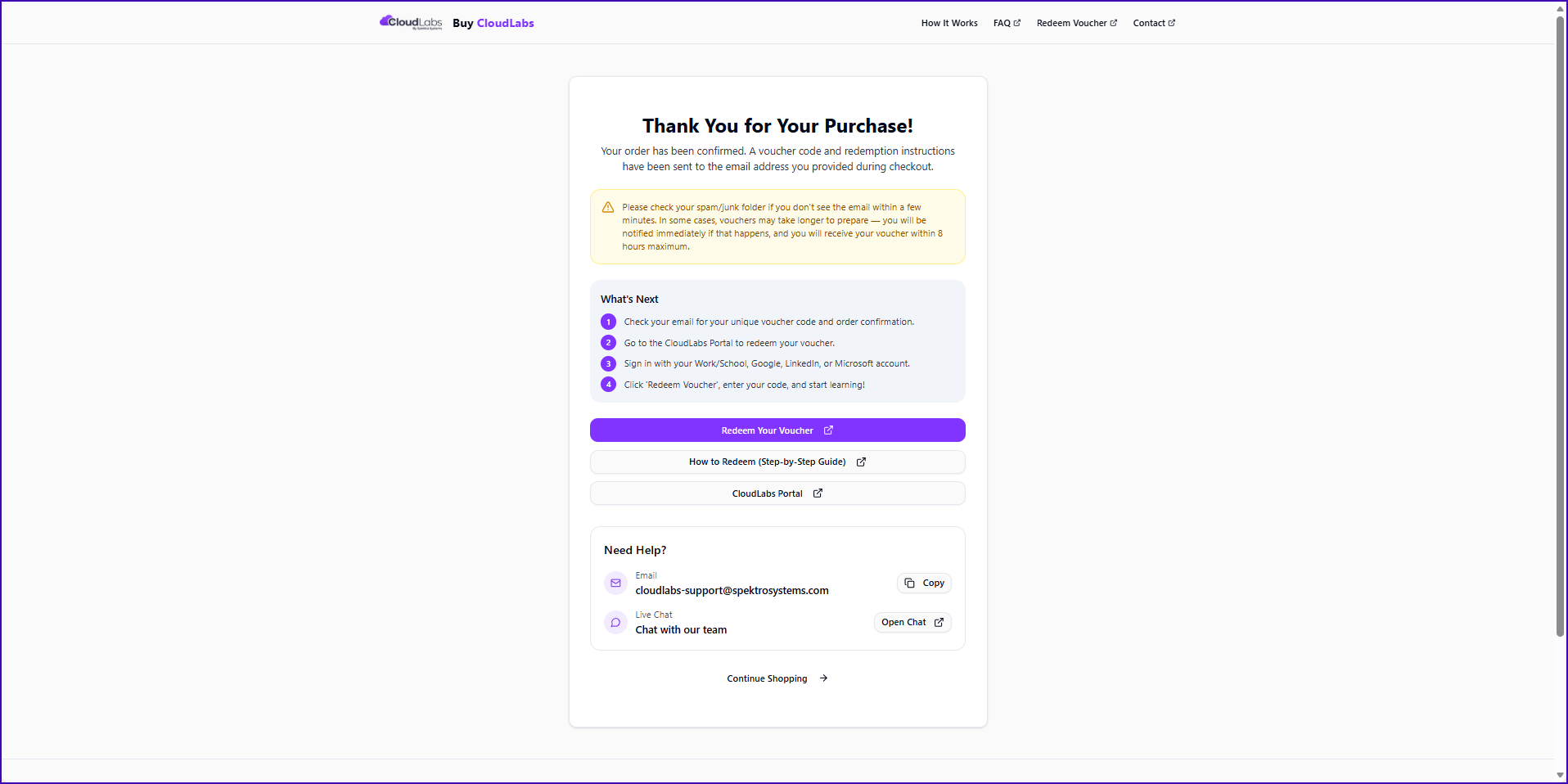
Step 3: Payment Confirmation
After successful payment, a confirmation screen is displayed
The page confirms:
Payment is completed.
You will receive an email with next steps.
Step 4: Receive Voucher Email from CloudLabs
You will receive an email from CloudLabs Support at the same email address used during checkout. This email contains:
Your Voucher Code
An Activate Now button
Course and lab details
⏱️ Email delivery timeline: Within 24 business hours after payment.
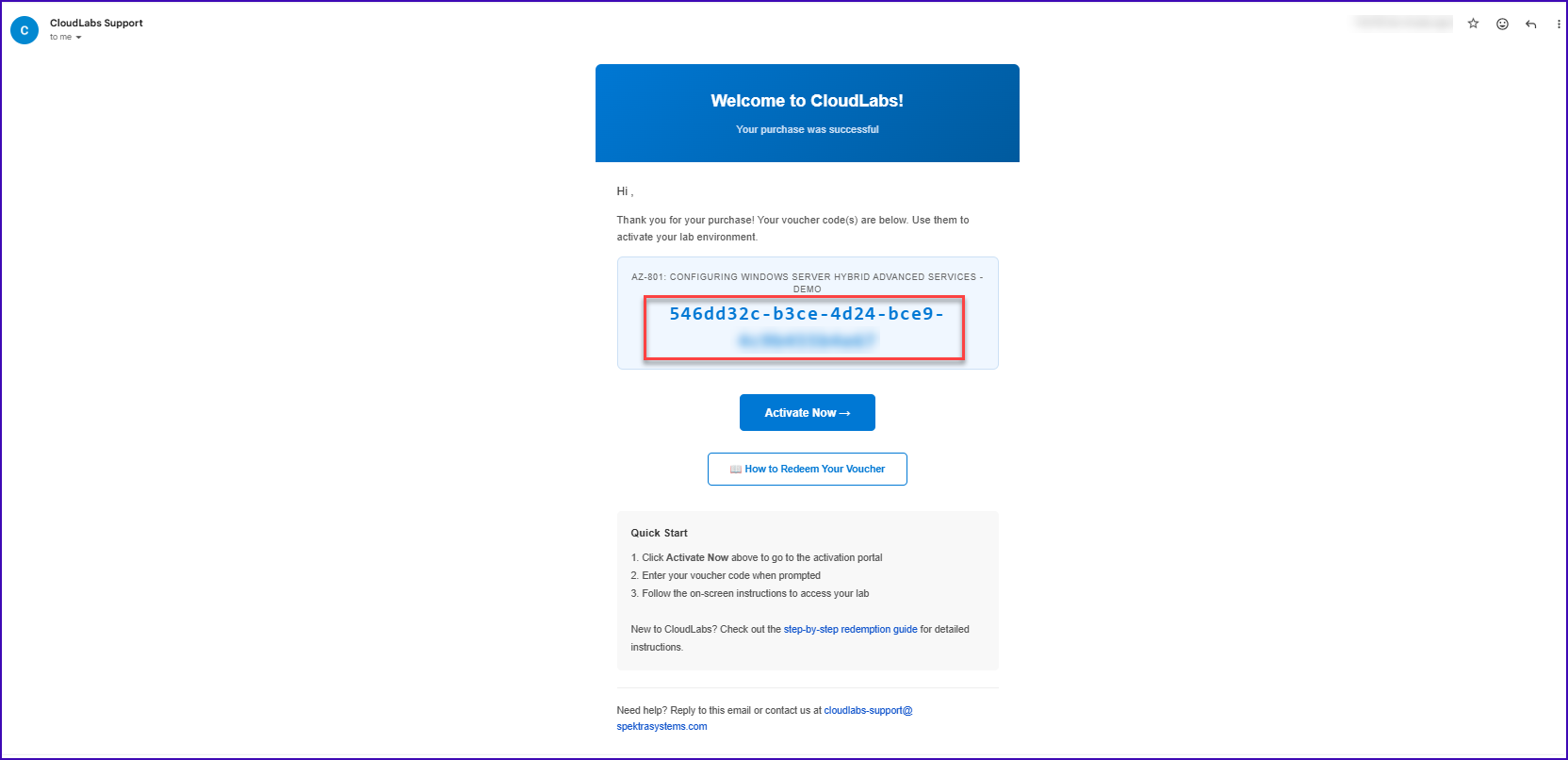
Step 5: Activate Your Voucher
To activate your access:
Click Activate Now
When prompted, enter the voucher code shown in the email
Submit to proceed
Step 6: Quick Start & Lab Access
Voucher Redemption Guide (After Activation)
Once you receive your voucher email and click Activate Now, you can refer to the official step-by-step redemption guide if needed:
👉 How to Redeem a Voucher
This guide explains:
Where to enter the voucher code
What happens after redemption
How to access your lab environment
Follow the on-screen instructions
Your lab environment/tab will be launched
You can now start using the lab as per your course schedule

📞 CloudLabs Support -Contact Options
CloudLabs support is available 24×7 (365 days a year) for learners and instructors.
✉️ Email Support
You can contact the support team via email at:
cloudlabs-support@spektrasystems.com (Primary learner support email)
When emailing, include:
The email you registered with
Your lab name or voucher code
Any error messages or screenshots -this helps speed up resolution.
💬 Live Chat Support
CloudLabs offers live chat support for real-time help:
Live Chat: CloudLabs Live Chat Support MS
Live chat is available 24×7 and can be used to troubleshoot issues like:
Activation problems
Lab launches failures
Voucher or access delays
🧑🏫 Instructor & Admin Support
If you are an instructor or admin, your lab signup email will often include dedicated support email and live chat links.
If unavailable, use: cloudlabs-support@spektrasystems.com
ℹ️ Best Practices When Contacting Support
To help resolve issues faster, include in your message:
Your registered email
Lab name or voucher code
Any screenshots or error details
Steps you attempted before the issue
Frequently Asked Questions (FAQs)
1. Where do I get the purchase link?
The purchase link is shared by your instructor or professor. You must use this link to purchase the voucher.
2. Do I need to create an account before purchasing?
No. You do not need to create an account before purchasing. You can complete the purchase directly using the provided link.
3. Which email address should I use during checkout?
Use a valid and accessible email address. This email address is where you will receive:
Your voucher code
The Activate Now link
If the email is incorrect, voucher delivery will be delayed.
4. When will I receive my voucher email?
You will receive an email from CloudLabs Support within 24 business hours after successful payment.
5. I completed the payment but did not receive the voucher email. What should I do?
First, check:
Spam or Junk folder
That the email entered during checkout is correct
If you still do not receive the email within 24 business hours, contact CloudLabs Support.
6. What does the voucher email contain?
Your voucher code
An Activate Now button
Basic instructions to activate your lab access
7. How do I activate my voucher?
To activate:
Open the voucher email
Click Activate Now
Enter the voucher code when prompted
Follow the on-screen instructions
8. Can I share my voucher with someone else?
No. Voucher codes are unique and intended for single-user use only. Sharing or reusing a voucher may result in access issues.
9. What happens after I activate the voucher?
After activation:
Your lab environment/tab will be launched
You can access the lab as per your course schedule
Follow the on-screen instructions to begin
10. Can I activate the voucher immediately after purchase?
Yes, once you receive the voucher email, you can activate it immediately using the Activate Now option.
11. What if I entered the wrong email during purchase?
If the email address was incorrect:
Voucher delivery may fail
You must contact CloudLabs Support for manual assistance
12. Is payment secure?
Yes. Payments are processed through a secure and trusted payment gateway.
13. Who should I contact if I face issues with payment or activation?
For any issues related to:
Payment confirmation
Voucher delivery
Voucher activation
Please contact CloudLabs Support using the support email mentioned in the voucher email.
14. Can I use the voucher on multiple devices?
Yes, but only one active lab session is allowed per voucher, based on course access rules.
15. Is there a time limit to activate the voucher?
The activation timeline depends on the course. It is recommended to activate the voucher soon after receiving the email.