Overview
CloudLabs Cosmos is the AI-native lab authoring workspace within the CloudLabs platform. It enables organizations to design, validate, and operate hands-on cloud labs using artificial intelligence.
Instead of manually creating deployment templates, lab documentation, and validation scripts, authors describe the desired learning scenario in natural language. Cosmos generates a complete CloudLabs-ready lab package that can be reviewed, refined, and published.
CloudLabs Cosmos is designed to accelerate lab development while maintaining author control over every generated artifact.
Key Capabilities
CloudLabs Cosmos provides AI-assisted capabilities throughout the complete lab authoring lifecycle.
AI-powered lab generation
Infrastructure template generation
Lab guide generation
Automated validation generation
Live portal verification
AI-assisted lab operations
Structured review workflow
CloudLabs bundle export
Architecture
CloudLabs Cosmos consists of three major stages:
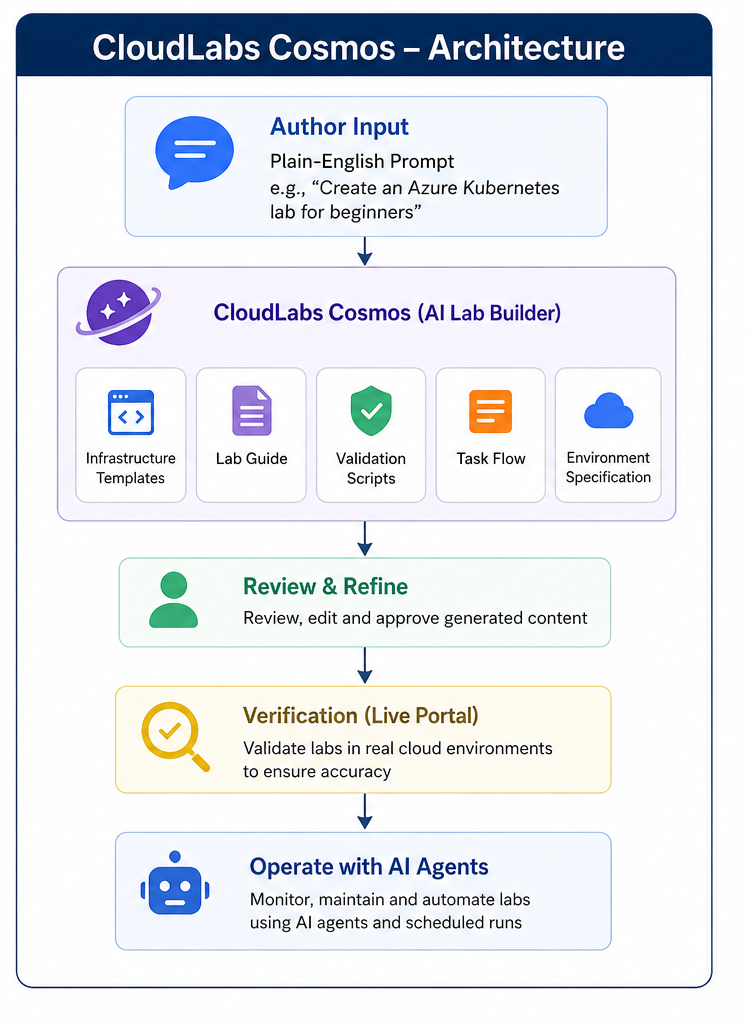
How CloudLabs Cosmos Works
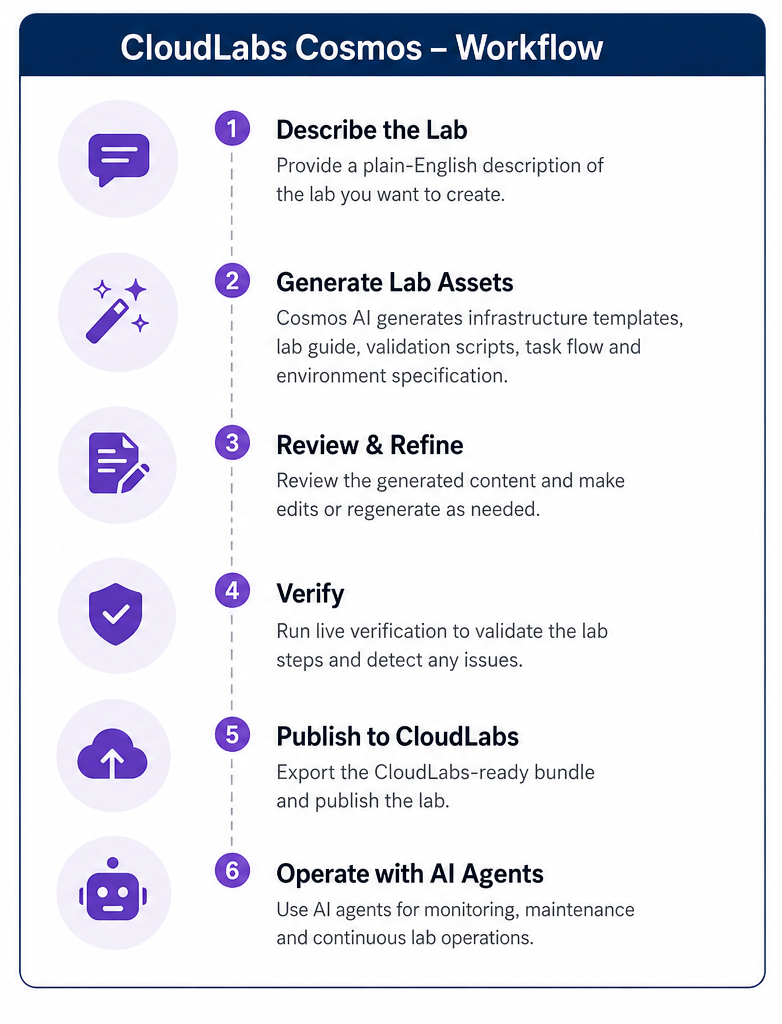
Step 1 – Describe the Lab
The author provides a natural language description of the required hands-on experience.
Example:
Create a 60-minute Azure Functions lab where learners deploy an Azure Function with a Cosmos DB trigger and validate the deployment.
The prompt may include:
Learning objectives
Target cloud provider
Required Azure, AWS, GCP
Expected duration
Difficulty level
Assessment requirements
Cosmos interprets the prompt and prepares the required lab assets.
Step 2 – Generate Lab Assets
Based on the provided prompt, CloudLabs Cosmos automatically generates the lab components required for CloudLabs.
Generated artifacts include:
Infrastructure Templates
Deployment templates required to provision the lab environment.
Examples:
Azure ARM templates
Resource definitions
Environment configuration
Lab Guide
A structured learner guide containing:
Introduction
Objectives
Prerequisites
Step-by-step tasks
Expected outcomes
Validation Logic
Validation scripts verify that learners successfully complete the required activities.
Examples include:
Resource existence checks
Configuration validation
Task completion verification
Task Flow
The sequence of activities that learners perform throughout the lab.
Environment Specification
Configuration describing the cloud resources required by the lab.
CloudLabs packages these artifacts into a CloudLabs-ready bundle for review.
Step 3 – Review and Refine
Before publication, generated content can be reviewed and modified.
Authors can:
Edit generated documentation
Modify infrastructure templates
Update validation logic
Regenerate selected sections
Approve final content
This review workflow ensures that subject matter experts retain full control over published content.
Step 4 – Verify
CloudLabs Cosmos validates completed labs against live cloud portals.
During verification, Cosmos:
Executes the lab workflow
Captures each instructional step
Confirms successful completion
Detects instructional drift
Identifies discrepancies between documentation and actual cloud experiences
This verification process helps ensure published labs remain accurate as cloud platforms evolve.
Step 5 – Operate
CloudLabs Cosmos supports ongoing lab operations through AI-powered agents.
Operational capabilities include:
Scheduled execution
Continuous monitoring
AI-assisted maintenance
Automated operational workflows
MCP-enabled agent interactions
These capabilities help reduce the operational effort required to maintain large lab catalogs.
CloudLabs Cosmos Deliverables
CloudLabs Cosmos produces a CloudLabs-ready package containing:
Artifact | Description |
|---|---|
Infrastructure Templates | Deployment templates required for provisioning cloud resources |
Lab Guide | Step-by-step learner documentation |
Validation Scripts | Automated verification logic |
Task Flow | Ordered learner activities |
Environment Specification | Infrastructure configuration |
CloudLabs Bundle | Package ready for CloudLabs deployment |
Supported Cloud Platforms
CloudLabs Cosmos supports authoring labs for multiple cloud providers, including:
Microsoft Azure
Amazon Web Services (AWS)
Google Cloud Platform (GCP)
The generated assets are designed for deployment within the CloudLabs platform.
Typical Authoring Workflow
Use Cases
CloudLabs Cosmos can be used to create hands-on learning environments for a variety of scenarios, including:
Customer training
Product demonstrations
Proof-of-concept (POC) environments
Technical workshops
Hackathons
Cloud certification labs
University and academic programs
Hands-on assessments
These scenarios are supported through the broader CloudLabs platform for delivering scalable, cloud-based learning experiences.
Benefits
CloudLabs Cosmos helps organizations:
Accelerate cloud lab development through AI-assisted authoring.
Generate infrastructure, documentation, and validation assets from a natural language prompt.
Validate labs against live cloud environments before publication.
Maintain higher consistency across lab content through structured review workflows.
Support ongoing lab operations using AI-powered agents.