Overview
This document describes Dynamic Parameter Support for deployment parameters.
By default, deployment parameter files are static, requiring all parameter values to be predefined during template creation. As a result, every deployment uses the same parameter values, limiting deployment flexibility and increasing the likelihood of resource naming conflicts.
With Dynamic Parameter Support, template owners can designate selected deployment parameters as dynamic.
During deployment, users are prompted to provide values for these parameters through the portal UI, enabling customized deployments while reducing template duplication and improving overall deployment flexibility.
Prerequisites
To use this feature, enable the following feature flags:
Partner-level flag – Enables Dynamic Parameter Support for the partner.
Template-level flag – Enables Dynamic Parameter Support for a specific template.
Note: The template-level flag is visible only after the partner-level flag has been enabled. |

Note: In CloudLabs vNext Portal, the flag is auto enabled if a parameters file contain the dynamic parameters configurations. |
Dynamic Parameter Configuration
To make a deployment parameter configurable by attendees, set the isDynamic property to true in the parameter definition.
Parameters marked as dynamic are displayed in the deployment UI, where attendees can provide or modify their values before launching the deployment.
Supported Input Types
The following input types are supported:
text – Displays a text input field.
number – Displays a numeric input field.
password – Displays a masked password field.
checkbox – Displays a checkbox for boolean values.
list – Displays a drop-down list using the values defined in inputValues.
Parameter Properties
Property | Description |
|---|---|
isDynamic | When set to true, the parameter is displayed in the deployment UI for attendee input. |
userFriendlyLabel | The display name shown to attendees in the deployment UI. |
inputType | Specifies the type of input control to display. Supported values are text, number, password, checkbox, and list. |
value | The default value shown in the UI. Attendees can modify this value before deployment. |
inputValues | Applicable only when inputType is list. Defines the available options for the drop-down. |
List Input Format
For parameters with inputType set to list, each option consists of the following properties:
displayName – The user-friendly text displayed in the drop-down.
value – The actual value stored and used during deployment.
For example, the value Standard_LRS can be presented to attendees as Standard Locally Redundant Storage (LRS), making the available options easier to understand while preserving the underlying deployment value.
Sample Dynamic Deployment Parameter File URL’s
cloudlabs-prod-templates-s3.s3.us-east-1.amazonaws.com/dynamic-parameter/deploy-01.json
cloudlabs-prod-templates-s3.s3.us-east-1.amazonaws.com/dynamic-parameter/deploy-01.parameters.json
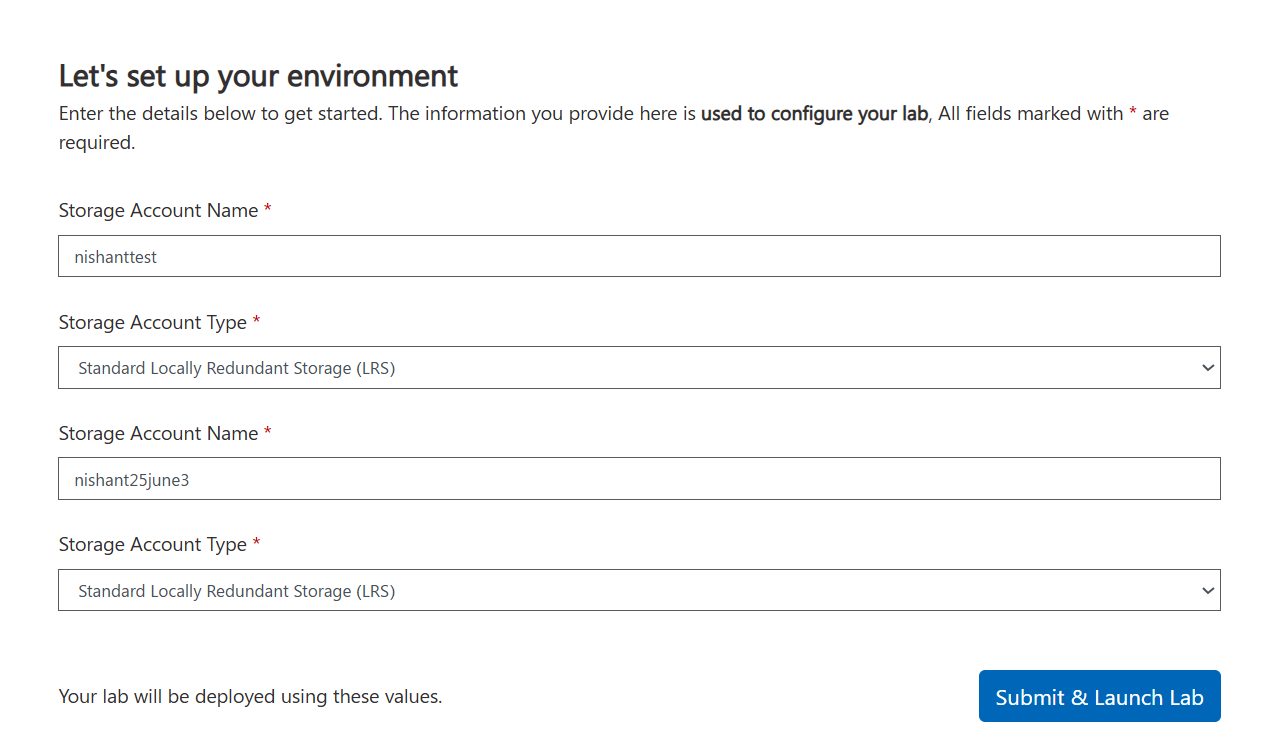
Attendee’s view:
Based on the template configuration, this is how the UI will looks to the attendee, where he can add the parameters and submit and launch.
Known Limitations:
Unique Parameter Names
If a template contains multiple cloud templates, ensure that each parameter file uses unique parameter names to avoid conflicts.Reset Deployment
If the original deployment used dynamic parameters, a reset deployment reuses the same values previously provided by the attendee. Attendees are not prompted to re-enter dynamic parameter values during a reset.Hot Instance Support
Hot Instances are not supported with this feature. Because Hot Instances are provisioned before an attendee launches a lab, the required dynamic parameter values are not available at provisioning time.